Cashback for QRIS Tap and QRIS Tap In Tap Out features in OCTO
Periode Program: 1 Feb 2026 - 31 Mar 2026
Terms and Conditions of the Program:
- Program Period: February 1st-March 31st, 2026
- Cashback for the QRIS Tap and QRIS Tap In Tap Out features in OCTO with the following details:
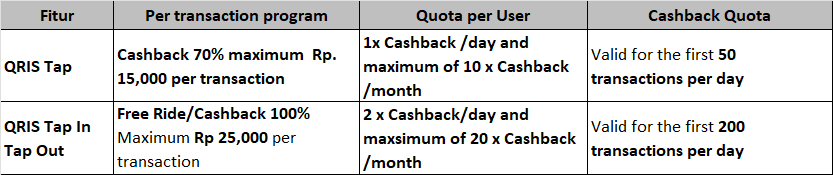
- The promotion is valid with no minimum transaction.
- If the daily quota is exhausted, the next transaction will not receive cashback.
- The QRIS Tap feature is available at all merchants that have EDC devices supporting the QRIS Tap feature.
- The QRIS Tap In Tap Out feature applies to all merchants who have accepted QRIS Tap In and Tap Out payments, including but not limited to:
- MRT (At stations with gates that have a dedicated line marked NFC/QRIS Tap)
- KCI KRL
- LRTJ
- LRT JaBoDeBek
- Transjakarta
- The QRIS Tap and QRIS Tap in Tap Out features are only available on mobile devices with the Android operating system.
- The QRIS Tap and QRIS Tap in Tap Out features are only available with Savings account funds.
- The promotion cannot be converted into cash, does not apply multiplicatively, and cannot be combined with other promotions.
- The maximum QRIS limit determined by Bank Indonesia is Rp10,000,000 per transaction
- Cashback will be credited in real-time or within a maximum of 1×24 hours to the OCTO Pay balance registered in the customers OCTO.
- If eligible, customers will see potential cashback information on the transaction summary page of the OCTO application.
- CIMB Niaga and event organizer have the right to change the terms and conditions of the program at any time, and/or terminate this program with prior notice.
Transactions Steps with QRIS Tap:
- Log in to the OCTO app and select the QRIS menu when making a payment.
- Select the QRIS Tap menu.
- Confirm your OCTO PIN and choose the funding source.
- Bring your phone close to the payment machine (EDC).
- Payment is complete and confirmation is received.
Transactions Steps with QRIS Tap in Tap Out:
- When you want to Tap In, select the QRIS menu in OCTO.
- Select the QRIS Tap menu.
- Confirm your OCTO PIN and choose the funding source.
- Place your phone near the payment machine at the entrance gate (Tap In).
- When you want to Tap Out, follow steps a–c above.
- Place your phone near the payment machine at the exit gate (Tap Out).
- Payment is successful and confirmation is received.
Disclaimer:
- CIMB Niaga reserve the right to cancel cashback benefits if there is any indication of misuse, fraud, manipulation, or non-compliance with the applicable terms & conditions of the program.
- The availability, quality, type, price, suitability, timing, and delivery process of goods and/or services provided by the Merchant to the Customer are entirely the responsibility of the Merchant.
- Any data and transaction instructions made by the Customer using QRIS OCTO are entirely the responsibility of the Customer.
- All claims for returns or exchanges are the sole responsibility of the Merchant and must be directly made by the Customer to the Merchant.
- For further information on how to make online purchases using OCTO, Customers can visit the website www.branchlessbanking.cimbniaga.co.id or contact Phone Banking 14041.